There are many users who are searching for reliable methods for opening Zimbra mail in Outlook 2024, 2021, 2019, 2016, and other supported versions. If you are also looking for a way to export Zimbra mailbox to Outlook PST, this guide explains the available approach and provides step-by-step instructions for converting Zimbra mailbox data into PST format. In this blog, you will learn:
- How to export Zimbra mailbox to Outlook 2024
- How to open Zimbra mail in Outlook 2021
- How to convert Zimbra mailbox data to PST
- How to export Zimbra On-Premises and hosted mailboxes
- How to migrate multiple Zimbra mailboxes in batch
Why Do Users Prefer Outlook Over Zimbra?
Although Zimbra provides dual options for its users to access emails using both Desktop as well as WebClient applications. Additionally, users also get the facility of connecting Zimbra data to MS Outlook via its another application, i.e., Zimbra Connector for Outlook.
However, some users still prefer to permanently shift from Zimbra to Microsoft Outlook and manage their mailbox data through the Outlook environment. There can be several reasons for this requirement, including:
- Slow synchronization or unresponsive behavior in some Zimbra environments
- The need to move from a Zimbra-based email environment to a Microsoft-based environment
- Familiarity with Microsoft Outlook and its interface
- Compatibility with existing Microsoft 365 or Exchange-based workflows
- The need to access mailbox data in Outlook PST format
- Business requirements for maintaining email data in PST files
- Microsoft Outlook provides an interactive user interface and is widely used for business email management.
Can You Open Zimbra Mail Directly in Outlook?
Zimbra and Outlook use different data environments, so simply having Zimbra mailbox data does not always mean that it can be opened directly in Outlook as a PST file.
The PST (Personal Storage Table) format is commonly used by Microsoft Outlook for storing email messages and other mailbox data. Therefore, users who want to access Zimbra mailbox data through Outlook may need to convert or export the required Zimbra data into PST format first.
How to Open Zimbra Mail in Outlook?
To precisely move all Zimbra contents to MS Outlook, you can use a professional third-party application. CubexSoft Zimbra Converter provides a simple yet effective solution for users who want to know how to export Zimbra mailbox to Outlook 2024, 2021, 2019, 2016, 2013, and other supported Outlook editions.
The tool provides dual options for exporting mailboxes from Zimbra On-Premises as well as hosted Zimbra accounts to Outlook PST. Its working process is simple for both technical and non-technical users to follow.
You can transfer multiple Zimbra user mailboxes at once in batch mode. The software also provides options to select required data and apply filters during the migration process.
How to Export Zimbra Mailbox to Outlook – Know All Steps in Detail
The migration process differs depending on whether you are working with Zimbra On-Premises mailbox data or a hosted Zimbra account.
- First, download, install open the software on a supported Windows OS.
- The software provides two options for converting Zimbra mailboxes
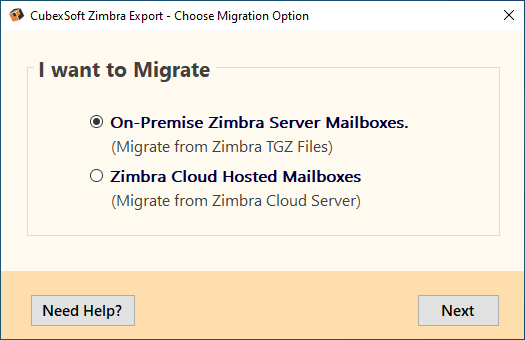
Option # 1 : Export On-Premise Zimbra Server Mailboxes to PST
- Select I want to migrate Zimbra On-premises mailboxes option and click Next.
- Now click on the Add Files button. A new pop-up window will open to let you select Zimbra files using the Add Files, Add Folders and Add Extracted Folders buttons.
- The software will now show the preview of the loaded Zimbra data in its right pane. You can review the mailbox data before starting the export process.Next, click on the Export button and choose PST from the Select Saving options list.
- Choose the required sub-options and advanced filters and then click the Convert button to start the process.
- The software will display the live progress status of the Zimbra to PST conversion process.
- On successful completion, a new message window opens with the message “Process complete successfully.”
Option # 2 : Export Zimbra Cloud Hosted Mailboxes to Outlook PST
- Choose I want to migrate Zimbra Cloud Hosted Accounts option and click Next.
- Enter your Zimbra user account login credentials, IMAP Host name, and Port number. Click the Login button to continue.
- The software will start loading all mail folders of the associated Zimbra user account on its left pane in the exact tree structure.
- Now choose PST as the desired output option from the drop-down list.
- Go to the Advanced Filters option and choose the required filters for selective migration, as per your requirements.
- Now click on the Backup button to start the Zimbra to Outlook export process.
- The software will convert all Zimbra mailbox items along with displaying their live progress status.
- On successful completion, a new message window opens showing the “Process completed successfully” message.
Benefits of Using Zimbra to PST Converter
- Batch Migration of Zimbra Mailboxes : The software allows you to convert multiple Zimbra user accounts’ mailboxes to PST at once in bulk. This feature enables users to save crucial time because the entire process can be completed within a few clicks.
- Easy GUI : The software carries a simple interface that enables even naïve users to effortlessly export Zimbra mailboxes to Outlook PST file.
- Convert both Zimbra On-premise as well as hosted account mailboxes : The tool is well equipped with dual functionality of converting mailboxes from Zimbra Desktop (On-premises) as well as Zimbra Webmail/Server (cloud hosted) to Outlook application.
- Convert Zimbra data accurately : The software maintains to keep intact the data integrity of Zimbra mailboxes while converting them to PST file. Additionally, the folder hierarchy of Zimbra folders is also retained as it is by the software.
- Saves attachments in original : All the email attachments are also converted by the software and kept in original. No changes are done to their file size and format and are embedded within their respective email message.
- Generates log report in TXT : Automatic creation of log report is another feature supported by the Zimbra to PST Converter that stores detailed information about the conversion process including date and time, saving option, total items, number of items converted, status, destination path etc. users can save this report in TXT for further perusal.
Free Software Evaluation Using Free Trial Edition
Users can check the software’s working efficiency using its free demo edition. It works similarly to the licensed version for evaluation purposes but comes with certain restrictions. The free demo version allows users to convert the first 25 items per Zimbra folder to PST. This gives users an opportunity to verify the software’s functionality and output before purchasing the licensed version.
Frequently Asked Questions
Q. How do I export Zimbra mailbox to Outlook PST?
A. To export Zimbra mailbox to Outlook PST, you need to convert the Zimbra mailbox data into PST format and then open or import the resulting PST file in Microsoft Outlook. A Zimbra-to-PST converter can simplify the process, especially when multiple mailboxes need to be migrated.
Q. Can I open Zimbra mail directly in Outlook?
A. Zimbra mailbox data cannot always be opened directly in Outlook as a PST file because Zimbra and Outlook use different mailbox data formats and environments. Converting the required Zimbra data to PST using professional is the best approach for accessing it through Outlook.
Q. Can I convert multiple Zimbra mailboxes to PST?
A. Yes, the Zimbra to PST Converter supports batch migration, allowing multiple Zimbra user mailboxes to be converted to PST in a single operation.
Q. Can I export hosted Zimbra mailboxes to PST?
A. Yes, the software provides an option to migrate Zimbra Cloud Hosted Accounts using the required account credentials.
Q. Does the Zimbra to PST Converter migrate email attachments?
A. Yes, email attachments are converted along with their associated email messages and retained in the resulting PST file.
Q. Can I selectively export Zimbra emails to PST?
A. Yes, the software provides advanced filtering options that can be used to select required mailbox data according to your migration requirements.
Q. Which Outlook versions can open the resulting PST file?
A. The resulting PST can be accessed in all Outlook editions – 2024, 2021, 2019, 2016 etc.
Conclusion
In this blog post, we have discussed an ideal solution for resolving users’ queries regarding how to export Zimbra mailbox to Outlook PST, including Outlook 2024, 2021, 2019, 2016, and earlier editions. The suggested Zimbra Converter provides options for converting Zimbra mailbox data to PST while supporting both On-Premises and hosted Zimbra environments. It also supports batch migration, attachments, folder hierarchy, filtering, and conversion reports. Besides converting Zimbra to PST, the tool also supports to migrate Zimbra mailboxes to Office 365, Exchange, Gmail, IMAP Server, PDF, MBOX, HTML, DOC, and many more options.